| GINO Graphics Suite - GINOGRAF v9.5 |  |
 |
| GINO Graphics Suite - GINOGRAF v9.5 | |
|
The two routines for setting up the axes system are:
| ggSetAxesPos() | for positioning each axis |
| ggSetAxesScaling() | for setting the ranges and scale type |
There are default positions and data ranges for both axes, but these are only provided for a fail safe situation. While the default position may be satisfactory, it is essential to define the scale type and data ranges to both X and Y axes (using ggSetAxesScaling()) before drawing any graph form. The drawing and titling of axes is optional.
The routine call which positions each axis is ggSetAxesPos():
ggSetAxesPos(or,xor,yor,axlen,xory)where xory determines which axis position is being defined (xory = GXAXIS for X axis and xory = GYAXIS for Y axis). xor, yor determines the axis position in user space coordinates and axlen determines the length in current units. The position (xor, yor) is defined as either the point where the axis starts (or=GAXISSTART) or the point where the natural origin of the data (the value 0.0) occurs on the axis (or=GDATAORIGIN).
The relationship of the above arguments is illustrated below
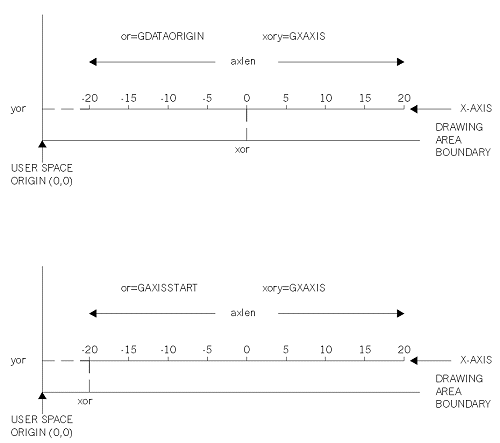 |
Effects of ggSetAxesPos |
For the two axes to intersect at xor, yor then the values for or, xor and yor should be constant for the calls of ggSetAxesPos() for each axis.
Successive calls to ggSetAxesPos() override earlier definitions for the same axis.
The routine to set the scaling type and range of either axis is ggSetAxesScaling():
ggSetAxesScaling(scale,nints,vbeg,vend,xory)where xory determines which axis scaling is being defined (xory = GXAXIS for X axis and xory = GYAXIS for Y axis). nints is the required number of intervals and vbeg,vend specify the start and end of the axis range.
There are five different scaling types, three linear (scale=GLINEARTYPE1-GLINEARTYPE3), one logarithmic (scale=GLOG10), and one discrete (scale=GDISCRETE). The different scaling types are shown below.
The three linear scaling types allow the user to specify either approximate or precise information for the number of intervals or the range of data. For scale=GLINEARTYPE1 the user provides approximate information and GINOGRAF will calculate new limits to include the range specified using sensible values for the interval between major tick marks. For scale=GLINEARTYPE2 the user provides approximate values for the range but a precise number of intervals. Again GINOGRAF will calculate new limits to include the range supplied. For scale=GLINEARTYPE3 the precise values for axis range and number of intervals is used.
Where logarithmic scaling is requested (scale=GLOG10), GINOGRAF will round up the axis range to the next power of 10 as shown below. The value of nints is not used. Note that neither axis ranges or data supplied to Graph or Chart routines can be less than or equal to zero if logarithmic axes are used.
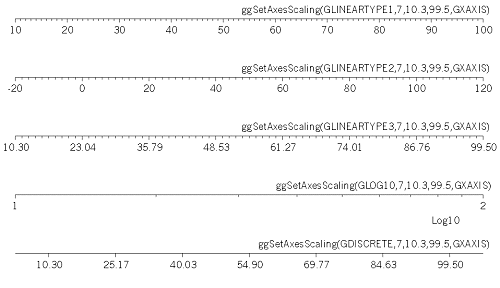 |
Various axis scaling types |
Discrete axes are used for Histograms and Bar Charts and for this type of axes nints sets the number of columns. The precise values of vbeg and vend are used to calculate the values displayed at the tick mark in the centre of the column. In terms of GINOGRAF, true graphs may only be drawn on the linear or logarithmic scales as they are continuous, however, graph drawing may be added to discrete axes (eg, a straight line fitted to a bar chart) without any adjustment (see mixing different graph types).
Each axis has a default scale type and range as follows:
scale = GLINEARTYPE3These settings are unlikely to be satisfactory for any real data sets. Therefore of all the axis definition routines that may be used, ggSetAxesScaling() is the most necessary before drawing any graph form. The user should note also that these defaults are restored after calling the routine
ggRestoreAxesSettings().Successive calls to ggSetAxesScaling() for a particular axis override previous calls for that axis. Once a position and scaling type has been defined, coordinates defined in terms of these axes are referred to as graphical axes coordinates.
The user may enquire the current position of either axis at any time using the routine ggEnqAxesPos():
ggEnqAxesPos(or,xor,yor,axlen,xory)where xory determines which axis positions are being enquired (xory=GXAXIS for X axis and xory=GYAXIS for Y axis). or, xor,yor and axlen return the position and length in the same manner as supplied to ggSetAxesPos().
The default position for the X and Y axes is shown above (being the bottom and left axes drawn in the box). These defaults are restored after calling the routine ggRestoreAxesSettings().
As explained above, for certain types of scaling GINOGRAF will adjust the requested number of intervals and increase the requested range of data values in order to display an axis with sensible annotation. The user may enquire the actual settings that GINOGRAF will use when it draws the axes with the routine ggEnqAxesScaling():
ggEnqAxesScaling(scale,nints,vbeg,vend,xory)where xory determines which axis scale parameters are being enquired (xory=GXAXIS for X axis and xory = GYAXIS for Y axis). scale returns the current type of scaling set for the axis; nints gives the actual number of intervals or columns on the axis and vbeg and vend give the actual data range of the axis.
The number of sub-intervals (ie. minor tick marks between the major intervals) on an axis is controlled by the amount of space available when drawing the axis. This in turn is controlled by the current character size used for the annotation. The character height controls the number of sub-intervals on the Y axis (and the size of the tick marks on the X axis) and the character width controls the number of sub-intervals on the X axis (and the size of the tick marks on the Y axis).